레이블이 link인 게시물을 표시합니다. 모든 게시물 표시

2018년 6월 20일 수요일

[Link] Python 개인 정리

Python 공부하면서 개인적으로 몰랐던 부분을 정리..


점프 투 파이썬
 : https://wikidocs.net/book/1

사이트를 참고하였음.


** 제곱연산자
: https://wikidocs.net/12#x-y


문자열 formatting
https://wikidocs.net/13#format

>>> "I eat {0} apples".format(3) 'I eat 3 apples'

>>> number = 10 >>> day = "three" >>> "I ate {0} apples. so I was sick for {1} days.".format(number, day) 'I ate 10 apples. so I was sick for three days.'


Container
- list [,]
 : https://wikidocs.net/14#_7
 : append, pop/delete/remove
- dict {:}
 : https://wikidocs.net/16#_6
 : [], get, del
 : keys, values
- tuple (,)
- set {,}


list slicing
https://wikidocs.net/14#_4

>>> a = [1, 2, 3, 4, 5] >>> a[0:2] [1, 2]


if
https://wikidocs.net/20#if_1

if 조건문: 수행할 문장1 수행할 문장2 ... else: 수행할 문장A 수행할 문장B ...


for
https://wikidocs.net/22#for

for 변수 in 리스트(또는 튜플, 문자열): 수행할 문장1 수행할 문장2 ...


function
https://wikidocs.net/24#_6

def 함수이름(매개변수): <수행할 문장> ... return 결과값

* ':' 다음 줄의 들여쓰기가 중요.


with
https://wikidocs.net/26#with

f = open("foo.txt", 'w') f.write("Life is too short, you need python") f.close()
를 아래와 같이 handle scope내에서 파일 처리 가능
with open("foo.txt", "w") as f: f.write("Life is too short, you need python")


class method의 첫번째 매개변수
https://wikidocs.net/28#_6


dir 내장 함수
https://wikidocs.net/32#dir


2017년 1월 9일 월요일

[Link] GivenWhenThen


GivenWhenThen


Given-When-Then is a style of representing tests - or as its advocates would say - specifying a system's behavior using SpecificationByExample. It's an approach developed by Dan North and Chris Matts as part of Behavior-Driven Development (BDD). [1] It appears as a structuring approach for many testing frameworks such as Cucumber. You can also look at it as a reformulation of the Four-Phase Test pattern.
The essential idea is to break down writing a scenario (or test) into three sections:
  • The given part describes the state of the world before you begin the behavior you're specifying in this scenario. You can think of it as the pre-conditions to the test.
  • The when section is that behavior that you're specifying.
  • Finally the then section describes the changes you expect due to the specified behavior.


INTRODUCING BDD
: https://dannorth.net/introducing-bdd/

As a [X]
I want [Y]
so that [Z]
where Y is some feature, Z is the benefit or value of the feature, and X is the person (or role) who will benefit. Its strength is that it forces you to identify the value of delivering a story when you first define it. When there is no real business value for a story, it often comes down to something like ” . . . I want [some feature] so that [I just do, ok?].” This can make it easier to descope some of the more esoteric requirements.

Given some initial context (the givens),
When an event occurs,
then ensure some outcomes.
To illustrate, let’s use the classic example of an ATM machine. One of the story cards might look like this:
+Title: Customer withdraws cash+
As a customer,
I want to withdraw cash from an ATM,
so that I don’t have to wait in line at the bank.
So how do we know when we have delivered this story? There are several scenarios to consider: the account may be in credit, the account may be overdrawn but within the overdraft limit, the account may be overdrawn beyond the overdraft limit. Of course, there will be other scenarios, such as if the account is in credit but this withdrawal makes it overdrawn, or if the dispenser has insufficient cash.
Using the given-when-then template, the first two scenarios might look like this:
+Scenario 1: Account is in credit+
Given the account is in credit
And the card is valid
And the dispenser contains cash
When the customer requests cash
Then ensure the account is debited
And ensure cash is dispensed
And ensure the card is returned
Notice the use of “and” to connect multiple givens or multiple outcomes in a natural way.
+Scenario 2: Account is overdrawn past the overdraft limit+
Given the account is overdrawn
And the card is valid
When the customer requests cash
Then ensure a rejection message is displayed
And ensure cash is not dispensed
And ensure the card is returned

2016년 6월 27일 월요일

[Link] GDB 사용

나중에 정리하려고 GDB 사용 관련 링크 저장

GDB를 이용한 디버깅

Debugging Under Unix: gdb Tutorial


실행 중인 process에 attach
$ gdb - `pidof PROCESS이름`


gdb 를 통한 디버깅 따라하기

GDB 사용법


2016년 4월 7일 목요일

[Link] C++와 C# 비교

https://msdn.microsoft.com/ko-kr/library/aa287549(v=vs.71).aspx

위 링크 복붙

기능참조할 항목
상속: 클래스는 하나의 기본 클래스에서만 구현을 상속할 수 있습니다. 또한 클래스 또는 인터페이스는 여러 인터페이스를 구현할 수 있습니다.class
배열: C# 배열 선언 구문은 C++ 배열 선언 구문과 다릅니다. C#에서는 "[]" 토큰이 배열 형식 다음에 나타납니다.배열
bool 형식: bool 형식과 다른 형식(특히 int) 간에는 변환이 없습니다.bool
long 형식: C++에서는 long 데이터 형식이 32비트인 반면 C#에서는 64비트입니다.long
struct 형식: C#에서 클래스 및 구조체는 구문적으로 다릅니다.struct는 값 형식이지만 class는 참조 형식입니다.struct
switch 문: C++ switch 문과 달리 C#은 case 레이블에 대해 순차 조건 검사를 지원하지 않습니다.switch
delegate 형식: 대리자는 C++의 함수 포인터와 대략 비슷하나 형식 안전성과 보안을 제공합니다.delegate
파생 클래스에서 재정의된 기본 클래스 멤버 호출base
override 예제 참조
new 한정자를 사용하여 상속된 멤버를 명시적으로 숨깁니다.new
재정의 메서드 선언에는 override 키워드가 필요합니다.override
조건부 컴파일에 전처리기 지시문을 사용합니다. C#에서는 헤더 파일을 사용하지 않습니다.C# 전처리기 지시문
예외 처리: finally 문 사용try-finally
C# 연산자: C#은 is  typeof 같은 추가 연산자를 지원합니다. 또한 일부 논리 연산자의 다양한 기능이 도입되었습니다.& 연산자
extern 키워드 사용extern
static 키워드 사용static
C++의 초기화 목록을 대체하는 다른 기본 클래스 생성 방법virtual 예제 참조
C# 프로그램의 일반적 구조: 네임스페이스, 클래스, 구조체, 대리자 및 열거형C# 프로그램의 일반적인 구조
Main 메서드가 C++의 main 함수와 다르게 선언됩니다. 또한 각 언어의 명령줄 인수 사용법을 비교하십시오.Main
메서드 매개 변수: C#은 참조 형식으로 매개 변수를 전달하는 데 포인터 대신 사용하는 ref  out 매개 변수를 지원합니다.ref
out
C#에서 포인터를 사용할 수 있지만 unsafe 모드에서만 가능합니다.unsafe
C#에서는 연산자 오버로드가 다르게 수행됩니다.C# 연산자
문자열: C# 문자열은 C++ 문자열과 다릅니다.string
foreach 키워드를 사용하여 배열 및 컬렉션을 반복 처리할 수 있습니다.foreach, in
C#에는 전역 메서드 또는 변수가 없습니다. 메서드 및 변수는class 또는 struct와 같이 형식 선언 내에 포함되어야 합니다.C# 프로그램의 일반적인 구조
C#에는 헤더 파일 또는 #include 지시문이 없습니다. 형식 이름을 정식으로 지정하지 않고 다른 네임스페이스의 형식을 참조하려면using 지시문을 사용합니다.using
C#의 지역 변수는 초기화하지 않으면 사용할 수 없습니다.5. 변수
소멸자: C#에서는 가비지 수집기가 자동으로 소멸자를 호출하기 때문에 소멸자 호출 시기를 제어할 수 없습니다.소멸자
생성자: C++와 마찬가지로 C#에서는 클래스 생성자를 제공하지 않으면 기본 생성자가 자동으로 생성됩니다. 기본 생성자는 모든 필드를 기본값으로 초기화합니다.인스턴스 생성자
C#은 비트 필드를 지원하지 않습니다.C++ Bit Fields
C# 입출력 서비스 및 형식 지정은 .NET Framework의 런타임 라이브러리에 따라 수행됩니다.C# 언어 자습서
C#에서는 메서드 매개 변수가 기본값을 가질 수 없습니다. 동일한 효과를 얻고 싶다면 메서드 오버로드를 사용합니다.컴파일러 오류 CS0241
C#과 다른 프로그래밍 언어 간의 비교에 대해서는 언어 관련 정보 설명서를 참조하십시오.

2016년 3월 28일 월요일

[Links] Scrum of scrum

Definition
http://guide.agilealliance.org/guide/scrumofscrums.html

A technique to scale Scrum up to large groups (over a dozen people), consisting of dividing the groups into Agile teams of 5-10. Each daily scrum within a sub-team ends by designating one member as "ambassador" to participate in a daily meeting with ambassadors from other teams, called the Scrum of Scrums. - See more at: http://guide.agilealliance.org/guide/scrumofscrums.html#sthash.XvWPKlh8.dpuf


Large scaled scrum team structure
https://www.mountaingoatsoftware.com/agile/scrum/team
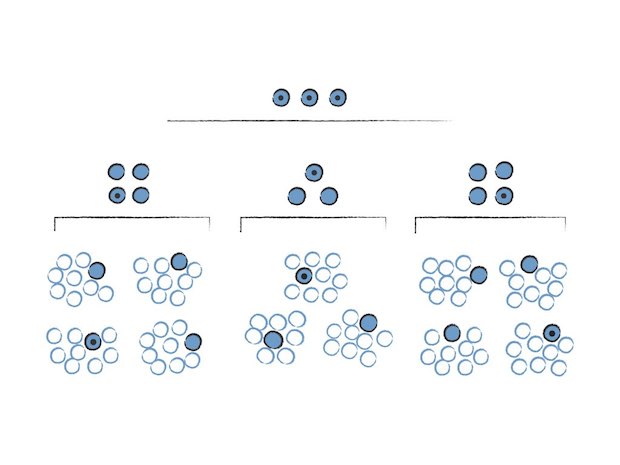
The illustration below shows how a Scrum of Scrums approach allows Scrum to scale up (in this case to 243 people). Each cell represents one person on a Scrum team. The bottom of this illustration shows teams with nine developers on them. One person from each team (the differently colored cell) also participates in a Scrum of Scrum to coordinate work above that team. Then from those nine-person teams, another person is selected (this time shown with diagonal lines) to participate in what is called a Scrum of Scrums of Scrums.
scrum of scrums 
Read more about conducting the Scrum of Scrums meeting.

Using Scrum of Scrums with Agile Teams to Coordinate and Collaborate
http://www.infoq.com/news/2014/03/scrum-of-scrums
: 사실 대규모 조직에 대한 scrum 조직에 관련된 내용이 많지 않아서 그런지 scrum of scrum 관련 article이 별로 없다.


(참고) 제품책임자(Product Owner)
 <우선순위 미팅>
 PO는 2주에 한번 C레벨들과 함께 적절한 우선순위 맞춰 과제를 진행하고 있는 지 공유하는 
 우선순위 미팅를 가졌으며, 돋보이기 위한 경쟁의식때문에 우선순위 미팅은 우선순위를 고려하는 미팅이 아닌 과제 PT자리로 퇴색되고 말았으며, 해당 미팅을 통해 자율적으로 과제를 선정 진행한다는 초기의 스크럼 계획과는 달라 C레벨들의 입김에 따라 과제의 우선순위가 바뀌고, 진행중인과제가 홀딩되는 웃지 못할 해프닝도 있었다.
제품 소유자(Product Owner)에 대한 오해

Spotify 조직문화
https://selfothercontext.com/2013/02/27/spotify/

2015년 6월 22일 월요일

[Links] GPS 관련 정보들 모음. 위도, 경도 등등

GPS 관련 앱 개발로 관련 내용 좀 찾아봄.

[Geographic coordinate system]

: http://en.wikipedia.org/wiki/Geographic_coordinate_system

  . Latitude(위도), Longitude(경도)
  . 완전한 구형이 아닌 지구의 형태로 인해 여러가지 좌표계에 대한 설명을 확인 필요.


중고등학교에서 배운 내용이지만
위도는 적도(0)를 기준으로 위아래를 각 90도로 나눈 것이고 대체적으로 간격이 비슷하지만 경도는 Greenwich를 기준으로 지구를 각 360도 방향으로 세로로 나눈것이라 위도에 따라서 간격이 다르다.
그래서 경위도 기준으로 거리를 거리를 계산할 경우 경도와 위도의 특징을 생각해서 계산해야 하므로 다소 수식을 써서 계산이 필요하다.


경위도 좌표 표시의 다양한 방법 by 이마운틴
: http://www.emountain.co.kr/atl/view.asp?a_id=4054


경도와 위도로 거리와 위치를 알아보는 방법
상세한 수치는 좀 다르지만 대략적으로 쉽게 설명한 글
: http://m.blog.daum.net/esikhong/17163754


T map API 가이트 by SK 플래닛
https://developers.skplanetx.com/apidoc/kor/tmap/reference/

(T map API 가이드에서 발췌)
지도상에 위치를 표현 하기 위해 좌표를 사용 합니다.
우리가 많이 들어본 “동경132 북위 37”은 경위도 좌표계이며 용도에 따라 수 많은 좌표계가 존재 합니다.
T map Open API에서 제공하는 주요 좌표계는 다음과 같습니다.
① EPSG:3857 : Google Mercator 좌표계. EPSG:900913으로 사용되기도 합니다. 900913은 알파벳 GOOGLE과 비슷한 숫자의 조합으로 특별한 뜻을 가지고 있지는 않습니다.
② EPSG:4326 : WGS84 좌표계. 구글 Earth가 사용하고 있는 좌표입니다.
③ KATECH : 국내에서 자동차 내비게이션 시스템 용으로 개발된 좌표계로 KATEC 또는 KATECH 으로 표기하고 있습니다. 과거 국내 포탈 지도 서비스에서 대부분 이 좌표계를 사용했으며 현재의 지도 서비스는 EPSG:3857또는 EPSG:4326을 기본으로 하는 추세 입니다.
서울 광장의 위치를 각각의 좌표계로 나타내면 다음과 같습니다.
- EPSG3857 : Lat: "4518258.6620310" , Lon: "14135199.7637174"
- WGS84 : Lat: "37.5657321", Lon: "126.9786599"
- KATECH : Lat: "551988.4373341", Lon: "309969.0505621"


[GPS]


GPS 개요 by 국토지리정보원
http://sd.ngii.go.kr/sub/gps/gps_outl.jsp?serv_cd=5&mmenu=1&smenu=1

Global Positioning System

간단히 보면 24개의 위성들을 통해서 측위와 시간 정보를 얻기 위한 시스템이며 군사목적으로 개발되었으나 대한항공 007편 격추사건을 통해서 민간에 개방되었음. GPS는 미국에서 운용되는 시스템이고 그외 러시아, 유럽에서 운용되는 시스템이 있다고 함.


대한항공 007편 격추 사건 (보면 볼수록 안타깝다.)
https://ko.wikipedia.org/wiki/%EB%8C%80%ED%95%9C%ED%95%AD%EA%B3%B5_007%ED%8E%B8_%EA%B2%A9%EC%B6%94_%EC%82%AC%EA%B1%B4
https://www.youtube.com/watch?v=10O3fKZBxz0

After Korean Air Lines Flight 007, a Boeing 747 carrying 269 people, was shot down in 1983 after straying into the USSR's prohibited airspace,[22] in the vicinity of Sakhalin and Moneron Islands, President Ronald Reagan issued a directive making GPS freely available for civilian use, once it was sufficiently developed, as a common good.[23]

그외 러시아, 유럽 시스템 소개
This article is about the American system. For the Russian equivalent, see GLONASS. For the European equivalent, see GALILEO. For other similar systems, see GNSS.


[좌표 기반 계산 방법들]


좌표 주변 반경을 계산 하는 방법에 대한 설명
보통 GPS 좌표를 기반해서 두 위치간 거리 측정, 좌표 주위 m 반경 내 있는 좌표들 확인등을 많이 하게 되는데 이를 위한 계산 방법 및 소스코드를 제공한다.
특히나 경도의 특성에 따라 제대로된 계산식을 구성하는 설명이 아주 잘 되어 있어 필독!
: http://janmatuschek.de/LatitudeLongitudeBoundingCoordinates

3.3 Computing the Minimum and Maximum Longitude – the Correct Way

Figure 1: Tangent meridians to the query circle [1]
Moving along a circle of latitude in order to find the minimum and maximum longitude does not work at all as you can see in figure 1: The points on the query circle having the minimum/maximum longitude, T1 and T2, are not on the same circle of latitude as M but closer to the pole. The formulae for the coordinates of these points can be found in a good math handbook like [1]. They are:
latT = arcsin(sin(lat)/cos(r)) = 1.4942(5)
lonmin = lonT1 = lon - Δlon = -1.8184(6)
lonmax = lonT2 = lon + Δlon = 0.4221(7)
where
Δlon = arccos( ( cos(r) - sin(latT) · sin(lat) ) / ( cos(latT) · cos(lat) ) )
      = arcsin(sin(r)/cos(lat)) = 1.1202(8)
Note that special care must be taken if the 180th meridian is within the query circle. See section 3.4 for details.


좌표 기반 계산 방법들을 설명하고 구현한 JavaScript 기반 코드
용도에 따라 참고해서 사용하면 될 듯 함.
: http://www.movable-type.co.uk/scripts/latlong.html

GPS좌표 <-> 도분초 변환방법
: http://en.wikipedia.org/wiki/Geographic_coordinate_conversion

(Wikipedia 발췌)
Informally, specifying a geographic location usually means giving the location's latitude and longitude. The numerical values for latitude and longitude can occur in a number of different formats:[2]
  • degrees minutes seconds: 40° 26′ 46″ N 79° 58′ 56″ W
  • degrees decimal minutes: 40° 26.767′ N 79° 58.933′ W
  • decimal degrees: 40.446° N 79.982° W
There are 60 minutes in a degree and 60 seconds in a minute. Then to convert from a degrees minutes seconds format to a decimal degrees format, one may use the formula
 \rm{decimal\  degrees} = \rm{degrees} + \rm{minutes}/60 + \rm{seconds}/3600.
To convert back from decimal degree format to degrees minutes seconds format,
 \begin{align}
  \rm{degrees} & = \lfloor\rm{decimal\  degrees}\rfloor \\
  \rm{minutes} & = \lfloor 60*(\rm{decimal\  degrees} - \rm{degrees})\rfloor  \\
  \rm{seconds} & = \lfloor 3600*(\rm{decimal\  degrees} - \rm{degrees} - \rm{minutes}/60)\rfloor \\
  \end{align}
where the notation \lfloor x \rfloor means take the integer part of x and is called a floor function.