그렇게 정리하다보니 대부분 game engine에 대한 documentation이 제대로 되어 있지 않아 주로 CocoonJS, Turbulenz에 대해서만 자세히 씀.
특이한것은 Turbulenz는 나름대로 자신들의 HTML5 게임 publishing을 제공하고 있다는 것과CocoonJS는 PhoneGap과 같지만 HTML5 게임에 특화되어 여러 모바일에서 HTML5 게임 실행을 가능하게 해준다는 것이다. (어떻게 보면 CocoonJS는 Game Engine 보다는 launcher의 개념이 맞을 듯)
CocoonJS 기반 앱에서 HTML5 game을 돌리는 건 생각보다 Quality가 좋았음. 아무래도 HTML5 feature들이 optimization이 잘 되어 있는 듯 하다. 다만 Apacha codova 기반으로 돌리다보니 여러 platform으로의 배포는 좋겠지만 앱 자체가 무거워질 수 밖에 없는 것은 단점일 듯.
Turbulenz의 게임들은 desktop Chrome에서는 동작이 되지만 FireFox, IE11에서는 동작이 안되는 앱들이 꽤 있었다. Game Engine을 설치해도 동작에 큰 도움이 되진 않는 것으로 보였다.
Mobile browser중 Chrome, Safari는 WebGL이 지원이 안되 실행이 불가능했고 그나마 FireFox 가 가장 동작이 되었고 기본 Android Browser도 일부 실행은 되었지만 touch가 먹지 않았음. (Developer Client를 설치해도 마찬가지...)
[HTML5, Javascript 기반 Game Engine들]
: http://designzum.com/2014/03/29/best-html5-and-javascript-gamen-engine-libraries/
HTML5 Game Engine들 간략 정리표
: http://html5gameengine.com/

HTML5 game 개발 관련 링크들 정리(Indie HTML5 game development)
: https://devcharm.com/pages/78-indie-html5-game-development
HTML5 Game App 개발 및 이슈, by 이창환(yich@dongguk.edu)
Game Engine에 대해서는 간략히 정리되어 있는 듯.
: http://www.slideshare.net/yich/html5-game-app-r2
Mobile browser의 HTML5 WebGL 3D graphics 지원 비교
: http://html5test.com/compare/browser/android-4.4/chromemobile-33/firefoxmobile-27/ios-7.0.html
근데 재미있는 것은 아래 Chrome 33(mobile)이 WebGL을 지원한다고 나와 있지만 실제 Galaxy S4로 측정해보면 안나오고 hidden flag를 켜야 함. (http://blog.laptopmag.com/how-to-enable-webgl-support-on-chrome-for-android)


[Construct2]

: http://en.wikipedia.org/wiki/Construct_(game_engine)
: cross platform 이며 IDE와 tool들을 제공하여
초보자들도 쉽게 익히고 게임을 만들 수 있음.
drap-and-drop 방식과 visual editor, behaviour-based logic system을 제공

- 홈피에서 제시하고 있는 features를 설명하는 문구들, 자세한건 읽어봐야 겠지만 문구들로 대략 감만 잡아보자... ㅜㅜ
: Quick and Easy, Powerful Event System, Flexible Behaviors, Instant Preview, Stunning Visual Effects, Multiplatform Export, Easy Extensibility
- HTML5를 지원하는 browser를 대부분 지원하며 일반적인 major mobile browser들도 지원함.
[CocoonJS]
: https://www.ludei.com/cocoonjs/
: HTML5 app들이나 game들을 mobile기기들에서 test, accelerate, deploy, monetize할 수 있도록 하는 platform
- 사실 상 HTML5 게임에 특화되어 mobile 기기(iOS, Andorid, Windows mobile 등)에서 실행할 수 있도록 도와주는 역할. HTML5, Javascript game engine들로 구현된 game들을 CocoonJS를 사용하여 배포 가능함.
- iOS(5.0), Android(2.3+)에서 최적의 Canvas 2D, WebGL feature를 제공하고 HTML5 feature에 특화된 customized된 webview를 제공함.
[Architecture Overview]

- Canvas+ : HTML5 API들의 subset을 포함하고 있음.
- Webview+ : HTML5 app 개발을 위해 특화된 web view (단 Android 4.0 이상)
- Apache Cordova : 다양한 OS(iOS, Android, Windows Phone 등)상에서의 deploy를 위해 사용하고 사용되는 Cordova는 Webview+를 기본 webview로 사용함.
- System's Webview : 개발자가 원한다면 system webview를 사용가능
- Extensions : In App purchases, Ads, Notification, Social extension, Google Play Games, Gamepad와 같은 Javascript extension들이 제공.
- In App purchases: to add monetization support to your app game. Show me more
- IAP는 publish될 platform의 IAP에 대한 interface임.
- Ads extension: you can monetize with ads using this extension. Show me more
- Notification: to add either push notifications or local notifications. Show me more
- Social extension: to add facebook and social integration to your app/game. Show me more
- Gamecenter: add gamecenter functionalities to your app.
- Google Play Games: add google play games functionalities to your app either in iOS or Android.
- Gamepad: Empower your games with gamepad support.
[devlopment, publish process]
: https://www.ludei.com/cocoonjs/how-to-use/

1. HTML5 게임을 개발
2. Android, iOS에서 CocoonJS launcher app을 설치하여 테스트
3. HTML5 code를 cloud-based platform에 업로드 하면 결과물 생성
- 결과물은 zip 형태로 압축되어 제공됨
- 계정 등급에 따라서 컴파일 시간 제약이 있음.
[CocoonJS Launcher]

: http://support.ludei.com/hc/en-us/articles/201048463-How-to-use
- Demo app들과 개발중인 HTML5 게임을 실제 device(iOS, Android)에서 실행해 볼 수 있고 디버깅도 가능함.
* ludei showcase 페이지에서 cocoonJS로 만들어진 게임들을 볼 수 있음.
* 생각보다 Demo game들의 Quality가 좋음.. 역시나 HTML5 featrure에 최적화가 잘 되어 있는 듯.
[Turbulenz]
: http://biz.turbulenz.com/home
: High quality HTML5 games를 대상으로 하며 개발사/개발자를 대상으로 hub를 제공하여 remote site에서 테스트를 하여 게임을 publish할 수 있도록 지원함. 아직 mobile 지원은 beta testing 중
- 2010년 $5M funding을 받아 2011년 출시됨. (https://angel.co/turbulenz)
- 2013년 Game Engine을 Open source 화 함.
[Platform Overview]
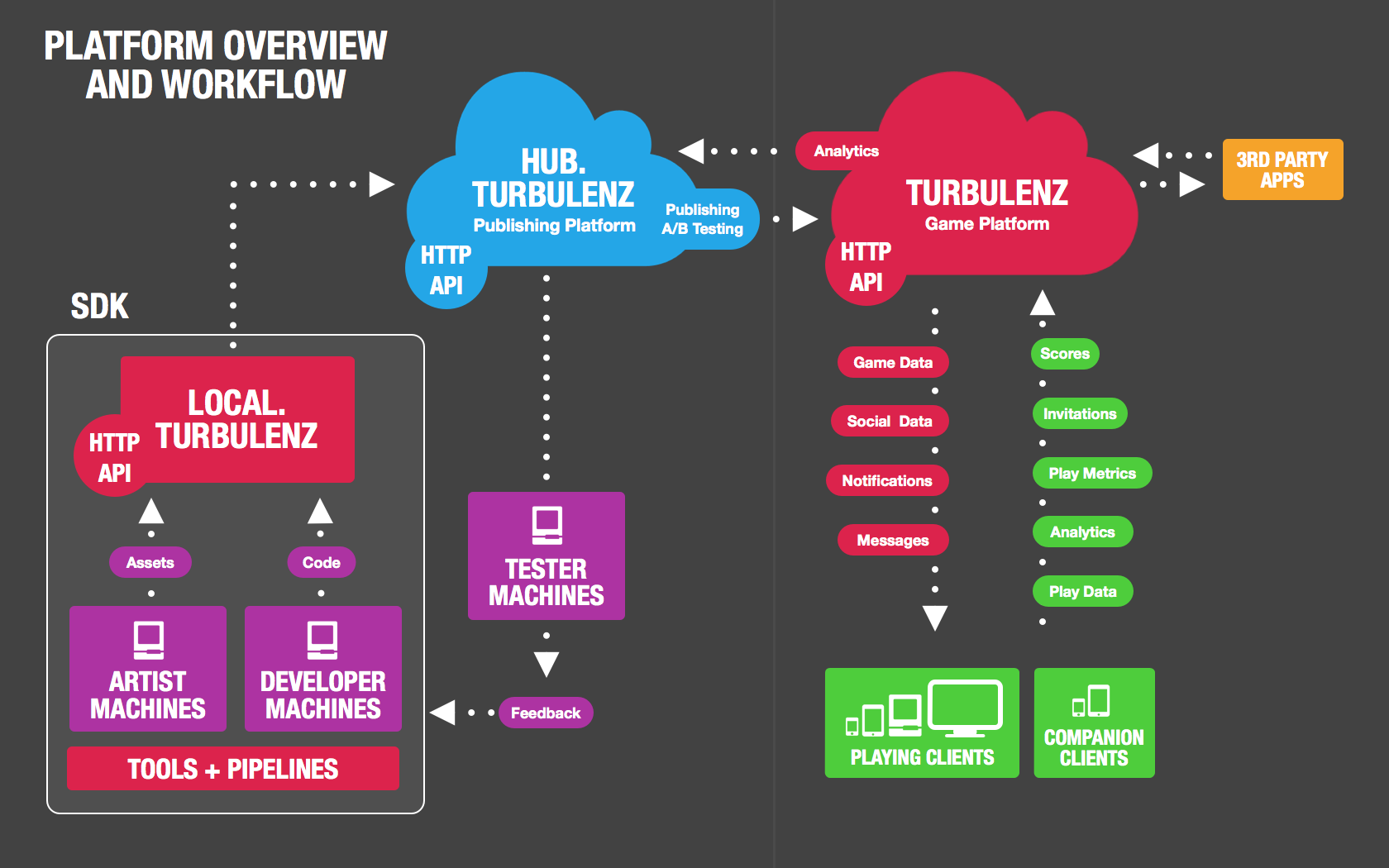
Turbulenz Platform은 개발자, 개발사가 게임을 publishing, monetizing을 가능하게 하는 server side infrastructure 형태의 구조
개발자, 개발사는 Turbulenz local server를 통해 게임을 개발.
Turbulenz Hub로 게임을 'Deploy'하여 remote environment에서 테스트 함.
Main Turbulenz game site로 'Publish'하여 clients(gamer)들이 game을 사용할 수 있게 함.
[Turbulenz products]
- Turbulenz Local Server
: Turbulenz SDK의 일부, web server와 packaged API들을 제공함. 개별 컴터에서 실행 가능
- Turbulenz game site
: Turbulenz website, 사용자들이 로그인, 게임 플레이, 다른 사용자들과 interaction이 가능
- Turbulenz Hub (https://hub.turbulenz.com)
: 개발자/개발사에서 게임을 publish하기 전 테스트할 수 있는 환경
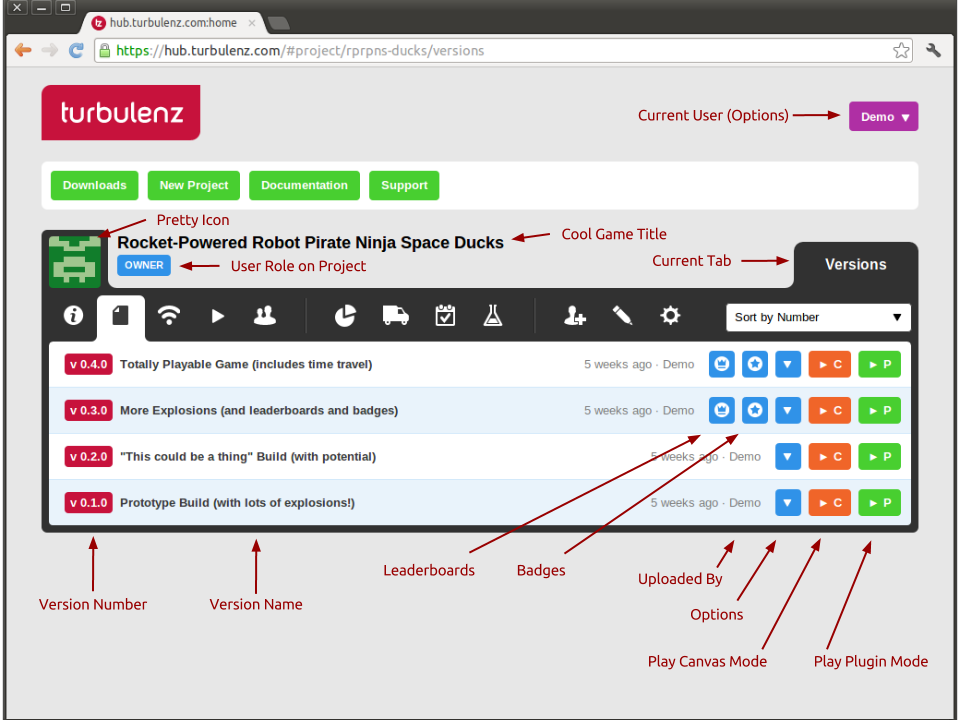
[게임 개발 process]
- 개발자와 Artist들은 Turbulenz SDK의 tool을 사용하여 게임을 만든다.
- 개발사는 Turbulenz local server(SDK에 포함)를 통해 게임을 개발하고 테스트하여 외부에 delploy할 수준까지 만듬.
- 게임을 테스트를 위한 다양한 stage들(pre-alpha, alpha, beta) 마다 Turbulenz local server에서 Turbulenz Hub로 각 버전들을 'Deploy'한다.
- 성공적으로 version이 Deploy되면 개발사는 게임을 internal/external team들과 live environment(게임방 같은)에서 테스트 한다.
- 적당한 release candidate이 만들어진 경우 해당 버전을 Turbulenz Hub에서 main turbulenz game site로 'Publish'함.
http://docs.turbulenz.com/hub/user_guide.html
[Turbulenz Hub를 통해 개발자는...]
Testing Game with access control in a Staging server
- 자신의 게임을 Hub(remote 환경)에서 deploy하여 test 할 수 있음.
- Pre-Released game을 Trusted parties에게 사용할 수 있도록 할 수 있음.
- Self-Publishing을 위한 방법을 제공하여 publishing 전에 개발자 자신이 content를 생성하고 실행할 수 있음.
- Limited Access Preview Version publishing을 지원함.
- game을 실제 deploy된 환경과 같은 online에서 테스트 하여 performance, latency, distribution channel 등의 측정 정보(metric)를 획득할 수 있음.
- published된 game과 진행되는 test에 대한 측정 정보(metrics)들을 볼 수 있음.
[Hub에서 확인 가능한 Metrics]
- Total Play Count
- Average Play Duration (secs)
- Total Play Duration (secs)
- Total Sessions Completed
- Daily Active Users (DAU)
- Weekly Active Users (WAU)
- Monthly Active Users (MAU)
- Engagement Ratio (Weekly)
- Engagement Ratio (Monthly)
- Daily User Retention
- Weekly User Retention
- Monthly User Retention
- Lifetime Total Users
- Cumulative Daily Retention
- Cumulative Weekly Retention
- Cumulative Monthly Retention
- Feed Add Count
- Feed Reply Count
- Followed Count
- Unfollowed Count
- Completed transactions
- Daily Revenue (USD)
- X Completed transactions
- X Daily Revenue (USD)
- Offering “X” Revenue (USD):
[Game Engine's supporting Platforms and Browsers]
- Windows (both 32 & 64-bit) XP / Vista / 7 / 8
- IE 8, 9, 10
- Firefox 3.6 and above
- Chrome
- Mac OS X 10.7 and above
- Safari 6 and above
- Firefox
- Chrome
- Linux (with WebGL support only)
- Firefox
- Chrome
- Android
- Chrome Beta
- Firefox Beta
* Android Browser, Android FireFox에서는 일부 demo 게임들이 돌아감. 하지만 Android Chrome이 WebGL을 지원하지 않아 게임 실행 불가
* iOS Safari가 WebGL을 지원하지 않아 게임 실행 불가
[Game Engine]
Runtime API들과 Offline tools로 구성됨.
Runtime API
- Low-level API
: libraries(ex OpenAL, WebGL)의 interface, low leve hardware access(ex input mechanism, vector math operation)의 interface들로 구성되어 있음.
: 하위 module(Device)
. GraphicsDevice, MathDevice, PhysicsDevice, SoundDevice, NetworkDevice, InputDevice
- HIgh-level API : JavaScript libraries의 모음. Scene Graph, Material System, Forward, Deferred Renderers 등과 같은 feature들.
: Features
. Scene Graph, Amination, Resource Manager, Server Requests, Deferred Renderer, Forward Renderer, Default Renderer, Simple Renderer, 2D Rendering, Utilities
[Code skeleton]
Javascript, TypeScript(http://www.typescriptlang.org/)를 지원함.
3개의 javascript들을 include하고 'canvas' id를 가진 <canvas>에 game engine이 drawing을 함. 화면 rendering은 update() function내에서 처리 되어야 한다.
[Turbulenz Developer Client]
- Mobile 환경에서 Turbulenz HTML5 engine의 low-level component들을 사용하기 위해 필요한 native implementation.
- 개발된 게임을 mobile환경에서 다양한 app stores, platform services(payment, user notification 등) feature들 사용할 수 있게도 한다.
- Local server와 연동되어 게임을 테스트 해볼 수 있으나 실제 Android market으로 deploy하는 방법에 대해서는 나와 있지 않음.
[기타]
- Game Engine License : MIT license
: https://github.com/turbulenz/turbulenz_engine/blob/master/LICENSE
- In app purchase를 위한 StoreManager Object를 제공함.
: Game에서 item을 생성하고 User가 해당 item들을 basket에 등록하고 계산하는 flow.
: Turbulenz에서 basket에 담기거나 구입된 item들을 관리하므로 내부적으로 store를 따로 구현할 필요 없고 StoreManager Object를 이용하면 됨.
: 관련된것인지는 모르겠지만 Android Developer client의 경우 permission들 중 billing을 추가해야 함.
[Pixi.js]
: http://www.pixijs.com/
: https://github.com/GoodBoyDigital/pixi.js
: lightweight 2D library, WebGL을 지원해 hardware acceleration 가능 (지원 browser한)
Features
- WebGL renderer (with automatic smart batching allowing for REALLY fast performance)
- Canvas renderer (Fastest in town!)
- Full scene graph
- Super easy to use API (similar to the flash display list API)
- Support for texture atlases
- Asset loader / sprite sheet loader
- Auto-detect which renderer should be used
- Full Mouse and Multi-touch Interaction
- Text
- BitmapFont text
- Multiline Text
- Render Texture
- Spine support
- Primitive Drawing
- Masking
- Filters
[ImpactJS]

: http://impactjs.com/
: web, mobile에서 동작하는 high performance 2D game들을 만들기 위한 JavaScript game framework.
- Impact Game Engine + Weltmeister Level Editor + Ejecta Framework for IPhone App Store
- GameEngine에서는 iPhone, modile device, desktop browser 로 client를 구분함.
[기타]
- License : Impact Commercial Software License Agreement
: http://impactjs.com/impact-commercial-software-license-agreement


