2019년 2월 16일 토요일

Google Play Store 업로드를 위해 앱 서명(signing)을 수동으로 하는 방법

최근 구글 정책 변경으로 오랜만에 앱을 업데이트하게 되었음.
https://www.bloter.net/archives/328897

거의 손 놓고 있었던 앱이었는데 기한까지 기능을 제거하지 않으면 앱이 제거된다고 하여
내가 사용하기 위해 어쩔 수 없이 업데이트해서 올릴 수밖에 없었음.
앱을 유지만 하는 것도 생각보다 어렵다.


Play Store에 올리기 위해 Android Studio에서 앱을 서명하려고 했는데
계속 password verification이 실패했다는 메세지가 나와서 결국 command line에서 수동으로 앱을 서명해서 올렸고 현상의 원인은 파악하지 못했음.

일단 앱을 서명하는 방법과 command line에서 수동으로 서명하는 방법은 다음과 같다.

앱을 서명하는 방법

: https://developer.android.com/studio/publish/app-signing#sign-apk

위 가이드를 보고 따라 하면 되는데 간략히 설명하면
Android Studio > Build > Generate Signed Bundle / APK 메뉴를 선택한다.

아래 화면에서 자신의 상황에 맞춰 Create new나 Choose existing을 선택하면 된다.

만약 서명을 위한 key를 새롭게 만든다면 다음을 참고해서 Play Store에 등록하고 업로드용 key로 만들어 등록하여 사용해야 한다.

기존에 만들어둔 key store를 선택하고 password를 입력하면 Key alias에서 key를 선택할 수 있고 이후 key의 password를 입력하면 된다. 이때 key store password가 틀리면 key alias를 선택할 수 없다. key password가 다르다면 서명이 실패한다.


다음 화면에서 release를 선택하면 앱 폴더의 build > output > apk > release 폴더에서 서명된 apk를 찾을 수 있다.


Key Store, 내부 Key 확인 방법

: https://docs.oracle.com/cd/E19226-01/821-0027/gfjwc/index.html

위처럼 Android Studio에서 key store 와 key를 확인할 수 있지만 다음 방법으로 확인할 수 있고 key 추출도 가능하다.

- key Store 내부 key 확인 방법
> keytool  -list  -keystore {keystore파일}  -v
   Enter keystore password:

keytool은 JDK 설치 위치에 있으니 아래 글을 참고하세요.
https://stackoverflow.com/questions/5488339/how-can-i-find-and-run-the-keytool

위 명령어를 실행 한 뒤 지정된 key store의 password를 입력하여 keystore의 정보와 내부 key 목록을 확인할 수 있다.

D:\key>"c:\Program Files\Java\jdk1.8.0_112\bin\keytool.exe" -list -keystore key_android.jks -v
키 저장소 비밀번호 입력:

키 저장소 유형: JKS
키 저장소 제공자: SUN

키 저장소에 1개의 항목이 포함되어 있습니다.

별칭 이름: csk
생성 날짜: 2016. 3. 13
항목 유형: PrivateKeyEntry
인증서 체인 길이: 1
인증서[1]:
소유자: CN=csk
발행자: CN=csk
일련 번호: 312a2964
적합한 시작 날짜: Sun Mar 13 19:21:02 KST 2016, 종료 날짜: Thu Mar 07 19:21:02 KST 2041
인증서 지문:
         MD5: ...(생략)
         SHA1: ...(생략)
         SHA256: ...(생략)
         서명 알고리즘 이름: SHA256withRSA
         버전: 3

확장:
... (생략)

- Key Store에서 Key도 추출 가능하다.
> keytool  -export  -keystore {keystore 파일} -alias {key alias이름}  -file {추출할 key 파일명}
   Enter keystore password:
 ex) keytool  -export  -keystore keystore.jks -alias csk -file csk.cer


Command line에서 수동으로 앱 서명 방법
: https://developer.android.com/studio/publish/app-signing#signing-manually

Android Studio에서 알아서 해주시면 부득이 한 경우 다음과 같이 진행하면 된다.

1. 빌드
2. zipalign을 사용하여 APK 정렬
3. apksigner를 사용하여 서명


1. 빌드
  Android Studio > View > Tool Windows > Terminal 에서

  gradlew assembleRelease  실행

  그럼 project_name/module_name/build/outputs/apk/에 module_name-unsigned.apk라는 이름의 APK가 생성된다.

2. zipalign을 사용하여 APK 정렬
  zipalign -v -p 4 my-app-unsigned.apk my-app-unsigned-aligned.apk

  참고로 zipalign은 Android SDK의 build tool에 있다.
  https://stackoverflow.com/questions/40004884/cant-find-apksigner-executable-to-manually-sign-apk

3. apksigner를 사용하여 서명
   apksigner sign --ks my-release-key.jks --out my-app-release.apk my-app-unsigned-aligned.apk

2018년 7월 26일 목요일

Deep learsing note, links

배운것 기억나는 선에서 대충 간략히 정리함.
틀릴 수 있음. cross check 필요

http://charlie0301.blogspot.com/2018/07/ai-machine-learning-links.html


Deep learning
: https://en.wikipedia.org/wiki/Deep_learning

Deep learning (also known as deep structured learning or hierarchical learning) is part of a broader family of machine learning methods based on learning data representations, as opposed to task-specific algorithms. Learning can be supervised, semi-supervised or unsupervised.


Single-Layer Perceptron (단층 퍼셉트론)
 : https://en.wikipedia.org/wiki/Perceptron


 : 뉴런을 따라 만든 알고리즘 하나의 단위, 여러 input에 대해 output을 출력
 : 계산은 연결된 이전 퍼셉트론과의 Linear Combination + Activation function
 : Linear Combination - 이전 Layer의 연결된 뉴런들의 출력값 * 연결 weight
 : Activation - 이전 뉴런 들과의 Linear Combination 값을 non-linear function을 통해 Activation
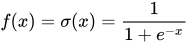
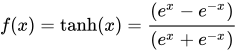
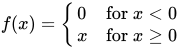
  - Activation function들 : Sigmoid, Hyperbolic Tangent (tanh), Rectified Linear Unit (ReLU)
    https://en.wikipedia.org/wiki/Activation_function

Logistic (a.k.a. Sigmoid or Soft step)Activation logistic.svg[1]
TanH                                        Activation tanh.svg
Rectified linear unit (ReLU)               Activation rectified linear.svg


Multi-Layer Perceptron (다층 퍼셉트론)
 : https://en.wikipedia.org/wiki/Multilayer_perceptron
 : 복수의 Perceptron을 연결한 구조
 : Non-linear Activation function + Multi-Layer


Artificial Neural Network (인공 신경망)
 : https://en.wikipedia.org/wiki/Artificial_neural_network


 : 다수의 Neuron이 Layer로 연결되어 복잡한 문제를 해결
 : Input Layer > Hidden Layer > Output Layer 로 구성
  - Input Layer : 초기값을 받는 가장 첫번째 Layer
  - Hidden Layer : 중간 단계의 모든 Layer
  - Output Layer : 마지막 Layer로 출력값 계산
    . 결과값을 그대로 받아 Regression
    . Sigmoid를 거쳐 Binary Classification
    . Softmax를 거쳐 K-Class Classification
 : Forward Propagation
 : Back Propagation Algorithm
  

Neural Network Learning Process 
1) Initialization
 : 학습하고자 하는 Parameter(θ) 초기값 선정
 : Xavier Initialization (for Sigmoid, tanh), He Initialization (for ReLU)

2) Cost Function
 : 함수 정의 (Cost Function을 최소화 하도록 학습 진행)
 : 용도에 따라 Least Square Error 또는 Cross-Entropy를 사용함.
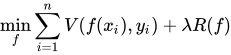
 : Parameter의 많아질 수록 overfitting 현상이 심화 되어 Cost Function + Regularization Term 추가
  > https://en.wikipedia.org/wiki/Regularization_(mathematics)

 : Overfitting을 방지하기 위한 방법으로 Dropout 방법도 있음.
  > https://en.wikipedia.org/wiki/Convolutional_neural_network#Dropout

3) Optimizer
 : Cost Function을 최소화하는 방향으로 Parameter(θ)를 변경하는 학습 방식을 적용
 : 일반적으로 Gradient Descent를 이용한 방식 사용
 : Batch normalization, Optimizer (Adam)


2018년 7월 25일 수요일

머신러닝 관련 note, links

배운것 기억나는 선에서 대충 간단하게 정리함.
틀릴 수 있음. cross check 필요

http://charlie0301.blogspot.com/2018/07/ai-machine-learning-links.html


Machine learning
: https://en.wikipedia.org/wiki/Machine_learning

Machine learning is a subset of artificial intelligence in the field of computer science that often uses statistical techniques to give computers the ability to "learn" (i.e., progressively improve performance on a specific task) with data, without being explicitly programmed.


머신러닝 분류


- Supervised Learning (지도 학습)
 : Input에 대한 Output을 예측하기 위해 학습, 정답이 존재

- Unsupervised Learning (비지도 학습)
 : Input 데이터에서 패턴을 발견하는 것, 정답이 없음

- Reinforcement Learning (강화 학습)
 : Trial & Error를 통한 학습

자세한 내용은 아래 링크 참조

머신 러닝(Machine Learning) 알고리즘 분류 – 지도 학습(Supervised Learning), 비지도 학습(Unsupervised Learning), 강화 학습(Reinforcement Learning) by Solaris


Output에 따른 분류

- Regression
 : 결과가 연속값(Continuous value)으로 주어짐, 모델이 그리는 선을 기반하여 결과값을 예측

- Logistic Regression, Binary Classification
 : 결과가 양자 택일 값(Binary value)임

- Clustering 
 : 결과가 여러개의 불연속값(Multiple discrete value)임


Machine Learning algorithms/methods 간략 설명


- Linear Regression (선형 회귀)


 : y와 한개 이상의 x와의 상관관계를 모델링
 : Cost Function (비용 함수), Linear Regression의 경우 Mean square error function(평균 제곱 오차 함수)을 활용
  => Gradient Descent Algorithm(경사하강법, 미분으로 경사를 확인하여 음의 방향으로 이동하여 다시 계산)을 사용해서 Cost가 최소가 되는 지점을 찾음. 이때 적절한 이동을 위해 Learning Rate(학습률)이 중요함.


- Logistic Regression (로지스틱 회귀)


 : 이진 분류(binary classification) 문제를 해결하기 위한 모델
 : Sigmoid Function을 이용하여 특정 데이터가 positive/negative class에 속할 확률을 계산
 : Cross-entropy를 비용함수로 설정하고 Gradient-based optimizer를 통해 학습을 진행함.


- Softmax Algorithm (소프트맥스 알고리즘)

 : 다중 클래스 분류 문제(Multi-class)를 위한 알고리즘
 : Logistic Regression을 변형/발전시킨 방법으로 binary class에서 multiple class 문제로 일반화

- Support Vector Machine (SVM, 서포트 벡터 머신)


 : 패턴 인식을 위한 지도 학습 모델, 주로 분류를 위해 사용
 : Soft-Margin SVM => margin을 최대화 하는 분류 경계면을 찾는 기법
  => Plus & Minus plain에 여유 변수를 두어 Robustness를 향상
 : Kernel Support Vector Machines => margin을 최대화 하는 분류 경계면을 찾는 기법
  => 데이터가 선형적으로 분리되지 않ㅇ르 경우 고차원 공간으로 변환하여 해결


등등등...

2018년 7월 24일 화요일

AI 관련 note, links

배운것 기억나는 선에서 대충 간략히 정리함.
틀릴 수 있음. cross check 필요


Artificial intelligence

Artificial intelligence (AI), sometimes called machine intelligence, is intelligence demonstrated by machines, in contrast to the natural intelligence displayed by humans and other animals. In computer science AI research is defined as the study of "intelligent agents": any device that perceives its environment and takes actions that maximize its chance of successfully achieving its goals.


Machine learning

Machine learning is a subset of artificial intelligence in the field of computer science that often uses statistical techniques to give computers the ability to "learn" (i.e., progressively improve performance on a specific task) with data, without being explicitly programmed.


Deep learning

Deep learning (also known as deep structured learning or hierarchical learning) is part of a broader family of machine learning methods based on learning data representations, as opposed to task-specific algorithms. Learning can be supervised, semi-supervised or unsupervised.


뭔소린지 모르겠음.
아래 NVIDIA 글이 설명이 잘 되어 있음.

인공 지능과 머신 러닝, 딥 러닝의 차이점을 알아보자, NVIDIA KOREA

What’s the Difference Between Artificial Intelligence, Machine Learning, and Deep Learning?, MICHAEL COPELAND

위 기사에서 발췌
인간의 감각, 사고력을 지닌 채 인간처럼 생각하는 인공 지능을 ‘일반 AI(General AI)’라고 하지만, 현재의 기술 발전 수준에서 만들 수 있는 인공지능은 ‘좁은 AI(Narrow AI)’의 개념에 포함됩니다. 좁은 AI는 소셜 미디어의 이미지 분류 서비스나 얼굴 인식 기능 등과 같이 특정 작업을 인간 이상의 능력으로 해낼 수 있는 것이 특징이죠.

머신 러닝은 기본적으로 알고리즘을 이용해 데이터를 분석하고, 분석을 통해 학습하며, 학습한 내용을 기반으로 판단이나 예측을 합니다.

딥 러닝은 인공신경망에서 발전한 형태의 인공 지능으로, 뇌의 뉴런과 유사한 정보 입출력 계층을 활용해 데이터를 학습합니다. 


- 머신러닝과 딥러닝의 주요 차이점 중 하나는 머신러닝을 위해서는 Feature 제공하여 학습을 하는데 반해 딥러닝은 모델 내부에 Feature extractor가 존재함.


참고 사이트
- 모두를 위한 머신러닝/딥러닝 강의

- 머신러닝 단기집중과정

- Machine Learning 강의노트
 : https://wikidocs.net/book/587

- 밑바닥부터 시작하는 딥러닝
 : https://github.com/WegraLee/deep-learning-from-scratch
- [개앞맵시] 스카이넷도 딥러닝부터


2018년 7월 23일 월요일

[Links] Pandas links, 복습...

이미 정리된 사이트들이 많아 그냥 찾아서 링크함.

10 Minutes to pandas
: https://pandas.pydata.org/pandas-docs/stable/10min.html

Python - Pandas 튜토리얼 1(데이터프레임 생성, 접근, 삭제, 수정), Deep Play
: http://3months.tistory.com/292

PANDAS(판다스) 기초 정리
: http://doorbw.tistory.com/172


복습으로 서울시 인구 수를 Pandas를 가지고 확인해봄.
제대로 했는지 모르겠음.
: https://colab.research.google.com/github/hallower/pandas_study/blob/master/seoul_people_count/Age.ipynb

2018년 6월 20일 수요일

[Link] Python 개인 정리

Python 공부하면서 개인적으로 몰랐던 부분을 정리..


점프 투 파이썬
 : https://wikidocs.net/book/1

사이트를 참고하였음.


** 제곱연산자
: https://wikidocs.net/12#x-y


문자열 formatting
: https://wikidocs.net/13#format

>>> "I eat {0} apples".format(3) 'I eat 3 apples'

>>> number = 10 >>> day = "three" >>> "I ate {0} apples. so I was sick for {1} days.".format(number, day) 'I ate 10 apples. so I was sick for three days.'


Container
- list [,]
 : https://wikidocs.net/14#_7
 : append, pop/delete/remove
- dict {:}
 : https://wikidocs.net/16#_6
 : [], get, del
 : keys, values
- tuple (,)
- set {,}


list slicing
: https://wikidocs.net/14#_4

>>> a = [1, 2, 3, 4, 5] >>> a[0:2] [1, 2]


if
: https://wikidocs.net/20#if_1

if 조건문: 수행할 문장1 수행할 문장2 ... else: 수행할 문장A 수행할 문장B ...


for
: https://wikidocs.net/22#for

for 변수 in 리스트(또는 튜플, 문자열): 수행할 문장1 수행할 문장2 ...


function
: https://wikidocs.net/24#_6

def 함수이름(매개변수): <수행할 문장> ... return 결과값

* ':' 다음 줄의 들여쓰기가 중요.


with
: https://wikidocs.net/26#with

f = open("foo.txt", 'w') f.write("Life is too short, you need python") f.close()
를 아래와 같이 handle scope내에서 파일 처리 가능
with open("foo.txt", "w") as f: f.write("Life is too short, you need python")


class method의 첫번째 매개변수
: https://wikidocs.net/28#_6


dir 내장 함수
: https://wikidocs.net/32#dir


2018년 5월 21일 월요일

C++ 11/14 관련 내용 대충 정리, weak_ptr

최신 C++을 공부하려 책을 보긴 했었는데
내용이 기존 문법과 함께 여기저기 흩어져 있어 보기에 좀 어려워
MSDN을 참고하여 대충 정리하려함.


C++11/14/17 기능에 대한 지원(최신 C++)
: https://msdn.microsoft.com/ko-kr/library/hh567368.aspx


weak_ptr

: https://msdn.microsoft.com/ko-kr/library/hh279672.aspx


- 참조수를 늘리지 않고 개체에 엑세스 하고자 할 경우 사용
 : shared_ptr instance 사이에서 순환 참조가 발생할 경우 shared_ptr가 삭제되지 않는 경우 발생
- weak_ptr 자체는 참조 수 계산에 참가하지 않으므로 shared_ptr가 유지되는 경우에서만 사용 가능함
 : 개체가 삭제된 경우 bad_weak_ptr 예외가 발생된다.


예제 :

https://msdn.microsoft.com/ko-kr/library/hh279672.aspx#Anchor_0

번역으로 본문의 결과가 좀 이상한데 실제 실행해 보면 다음과 같다.

Creating Controller0
Creating Controller1
Creating Controller2
Creating Controller3
Creating Controller4
push_back to v[0]: 1
push_back to v[0]: 2
push_back to v[0]: 3
push_back to v[0]: 4
push_back to v[1]: 0
push_back to v[1]: 2
push_back to v[1]: 3
push_back to v[1]: 4
push_back to v[2]: 0
push_back to v[2]: 1
push_back to v[2]: 3
push_back to v[2]: 4
push_back to v[3]: 0
push_back to v[3]: 1
push_back to v[3]: 2
push_back to v[3]: 4
push_back to v[4]: 0
push_back to v[4]: 1
push_back to v[4]: 2
push_back to v[4]: 3
use_count = 1
Status of 1 = On
Status of 2 = On
Status of 3 = On
Status of 4 = On
use_count = 1
Status of 0 = On
Status of 2 = On
Status of 3 = On
Status of 4 = On
use_count = 1
Status of 0 = On
Status of 1 = On
Status of 3 = On
Status of 4 = On
use_count = 1
Status of 0 = On
Status of 1 = On
Status of 2 = On
Status of 4 = On
use_count = 1
Status of 0 = On
Status of 1 = On
Status of 2 = On
Status of 3 = On
Destroying Controller0
Destroying Controller1
Destroying Controller2
Destroying Controller3
Destroying Controller4

Controller class는 내부에 others weak_ptr를 가지고 있고
RunTest()에서 다른 shared_ptr들을 others에 삽입하여 참조하도록 하였음.

Controller class 내부의 others를 shared_ptr로 바꾸면
각각의 use_count는 5가 되고 순환 참조로 인해 Controller들이 삭제 되지 않는다.


Modern Effective C++에서 관련된 chapter는 다음과 같고
더 자세한 내용을 원한다면 책을 꼭 읽는 것을 추천.
단 Modern Effective C++이 처음이라면 Effective C++을 먼저 읽는 것을 추천.

Effective Modern C++: 42 Specific Ways to Improve Your Use of C++11 and C++14
: http://a.co/0MIIC9k

Item 20: Use std::weak_ptr for std::shared_ptr- like pointers that can dangle.


- std::shared_ptr와 거의 유사하지만 참조 횟수에 영향을 미치지 않고
  지칭하는 객체를 잃은 상황을 확인할 수 있음.

std::shared_ptr<Widget> spw1 = wpw.lock();
auto spw2 = wpw.lock();
std::shared_ptr<Widget> spw3(wpw);

wpw이 expired 되었다면 spw1, spw2는 null이고
spw3를 만들때는 std::bad_weak_ptr exception 발생

아래는 책에서 말하는 loadWidget caching code임

std::shared_ptr<const Widget> fastLoadWidget(WidgetID id)
{
   static std::unordered_map<WidgetID, std::weak_ptr<const Widget>> cache;
   auto objPtr = cache[id].lock();
      if (!objPtr) {
         objPtr = loadWidget(id);
         cache[id] = objPtr;
      }
   return objPtr;
}

cache에 있는 widget이 만료되지 않았다면 (lock() != nullptr) cache된 widget을 제공.

- shared_ptr 개체를 참조할 때 순환 참조를 피하고자 사용하지만 이는 일반적인 상황은 아님,,,